![footer-logo.png]](https://help.intentwise.com/hs-fs/hubfs/footer-logo.png?width=210&height=40&name=footer-logo.png)
Overview
Amazon has upgraded the Settlement Report from V1 (flat file format) to V2, introducing a more standardized and consolidated structure for reporting prices, fees, and adjustments.
This article explains:
-
What changed between V1 and V2
-
How columns map between versions
-
How prices and fees are consolidated in V2
-
How to interpret amount-type, amount-description, and amount
-
An SOP for validating and using V2 data
What Changed: V1 vs V2 Structure
V1 Structure (Old Format)
Settlement Report V1 used separate column pairs for each price or fee type:
-
price-type / price-amount – Item price paid by customer
-
item-related-fee-type / item-related-fee-amount – Item-level fees
-
shipment-fee-type / shipment-fee-amount – Shipping fees
-
order-fee-type / order-fee-amount – Order-level fees
-
promotion-type / promotion-amount – Promotions and discounts
-
direct-payment-type / direct-payment-amount – Direct payments
-
misc-fee-amount, other-fee-amount – Miscellaneous fees
Important:
A single order could span multiple rows, with each row representing a different fee or price component
V2 Structure (New Format)
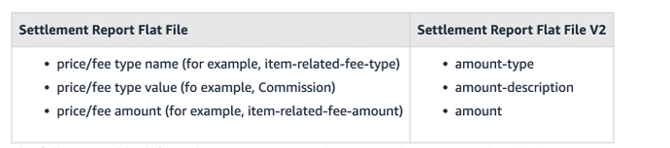
Settlement Report V2 consolidates all prices and fees into three standardized columns:
| Column Name | Purpose | Example |
|---|---|---|
| amount-type | High-level category | Commission, Fee, Principal |
| amount-description | Specific price or fee name | FBAPerUnitFulfillmentFee |
| amount | Monetary value | 5.99, 0.45, 25.00 |
Key Benefit:
Each row represents one consolidated amount, making reporting more consistent and easier to process.
Complete Column Mapping
Part A: Direct Passthrough Columns (No Change)
The following columns are identical in V1 and V2 and require no transformation:
| V1 Column | V2 Column | Description |
|---|---|---|
| settlement-id | settlement-id | Unique settlement identifier |
| settlement-start-date | settlement-start-date | Start of settlement period |
| settlement-end-date | settlement-end-date | End of settlement period |
| deposit-date | deposit-date | Expected bank deposit date |
| total-amount | total-amount | Total settlement value |
| currency | currency | Settlement currency |
| transaction-type | transaction-type | Order, Adjustment, etc. |
| order-id | order-id | Amazon order ID |
| merchant-order-id | merchant-order-id | Seller order ID |
| adjustment-id | adjustment-id | Adjustment identifier |
| shipment-id | shipment-id | Shipment identifier |
| marketplace-name | marketplace-name | Amazon marketplace |
| fulfillment-id | fulfillment-id | MFN or FBA |
| posted-date | posted-date | Transaction date (DATE) |
| posted-date | posted-date-time | Full timestamp |
| order-item-code | order-item-code | Amazon item identifier |
| merchant-order-item-id | merchant-order-item-id | Seller item ID |
| merchant-adjustment-item-id | merchant-adjustment-item-id | Seller adjustment item ID |
| sku | sku | Product SKU |
| quantity-purchased | quantity-purchased | Units purchased |
| promotion-id | promotion-id | Promotion identifier |
Part B: Consolidated Price & Fee Columns (Major Change)
V1 → V2 Consolidation Logic
V1 Columns Aggregated:
-
price-amount
-
item-related-fee-amount
-
shipment-fee-amount
-
order-fee-amount
-
promotion-amount
-
direct-payment-amount
-
misc-fee-amount
-
other-fee-amount
V2 Columns:
-
amount-type – High-level classification
-
amount-description – Specific fee or price name
-
amount – Sum of all relevant values
Formula:
price_amount + item_related_fee_amount + shipment_fee_amount + order_fee_amount + promotion_amount + direct_payment_amount + misc_fee_amount + other_fee_amount
Note: In V2, each row contains the total amount for that specific price or fee type, not fragmented values.
Logic for V2 amount-description and amount-type columns
Understanding amount-type and amount-description
|
Amount-Type |
Amount-Description |
Definition |
|
ItemFees |
Commission |
Fee charged against the value of the item sold. |
|
FBAPerUnitFulfillmentFee |
Per-unit fee charged to compensate Amazon for the cost of fulfilling. |
|
|
FBAWeightBasedFee |
This is the fee that we assess for FBA sellers on a per-item basis to compensate Amazon for the cost of shipping per order. |
|
|
GiftwrapChargeback |
Giftwrap charges for Amazon Fulfilled units are part of your gross sales proceeds. We report them to you as revenue (see Giftwrap) and charge you a GiftwrapChargeback fee equal to the amounts charged to the customer. |
|
|
RefundCommission |
When a refund is issued, the fee charged against the original fee amount being refunded. |
|
|
ShippingChargeback |
Shipping charges for Amazon Fulfilled units are part of your gross sales proceeds. We report them to you as revenue (see Shipping) and charge you a ShippingChargeback fee equal to the amounts that you charged the customer. |
|
|
VariableClosingFee |
Variable closing fee charge for the sale of an item. Refer to the Selling on Amazon Fee Schedule for more details. |
|
|
ItemPrice |
GiftWrap |
Giftwrap charges for Amazon Fulfilled units are part of your gross sales proceeds. We report them to you as Giftwrap revenue and charge you a fee (see GiftwrapChargeback) equal to the amounts that you charged the customer. |
|
Goodwill |
Customer refund, not applied against a specific charge. |
|
|
Principal |
Amount that you charged (or refunded) to the customer for an item. |
|
|
RestockingFee |
We might charge customers a RestockingFee for returns that are not eligible for a full refund. We report this adjustment to the customer's refund as a seller credit. |
|
|
Shipping |
Shipping charges for Amazon Fulfilled units are part of your gross sales proceeds. We report them to you as Shipping revenue and charge you a fee (see ShippingChargeback) equal to the amounts charged to the customer. |
|
|
Current Reserve Amount |
The reserve amount is the amount held back in a settlement period to cover potential expenses such as returns and refunds. |
|
|
Other-Transaction |
Previous Reserve Amount Balance |
The reserve amount from the previous settlement report. |
|
Refund Reimbursal |
Reimbursal of amount charged to seller for customer refund. |
|
|
Storage Fee |
Storage fee for seller's items stored in Amazon's warehouse. |
|
|
Shipping |
Shipping promotion applied to qualifying orders. |
|
|
Promotion |
FBAperOrderFulfillmentFee |
Per-order fee charged to compensate Amazon for the cost of fulfilling per order. |
|
Shipment-Fees |
FBATransportationFee |
This is the fee that Amazon assesses for FBA Multi-Channel Fulfillment to cover the costs of shipping per order. |
Example: Single Order Comparison
V1 Format (Multiple Rows)
| order-id | price-type | price-amount | item-related-fee-type | item-related-fee-amount |
|---|---|---|---|---|
| 123456 | ItemPrice | 25.00 | – | – |
| 123456 | – | – | Commission | 3.75 |
| 123456 | – | – | FBAPerUnitFulfillmentFee | 2.50 |
V2 Format (Consolidated)
| order-id | amount-type | amount-description | amount |
|---|---|---|---|
| 123456 | ItemPrice | Principal | 25.00 |
| 123456 | ItemFees | Commission | 3.75 |
| 123456 | ItemFees | FBAPerUnitFulfillmentFee | 2.50 |
Result:
All price and fee details are cleanly structured using amount-type, amount-description, and amount.
Settlement Report V2 simplifies fee and price reporting by replacing fragmented columns with a standardized, extensible structure, making reconciliation, automation, and reporting significantly more reliable.