![footer-logo.png]](https://help.intentwise.com/hs-fs/hubfs/footer-logo.png?width=210&height=40&name=footer-logo.png)
In this article, you’ll learn how to locate AMC-created custom audiences and add them to your SD campaigns effectively.
Steps for locating AMC Custom Audiences in the Amazon Console
-
Log in to your Amazon Console: Navigate to the Amazon Console and select a sponsored display campaign where you want to add the audience.
-
Locate the Custom Audiences: Under the Targeting tab, click on Custom Audience to view all created audiences.
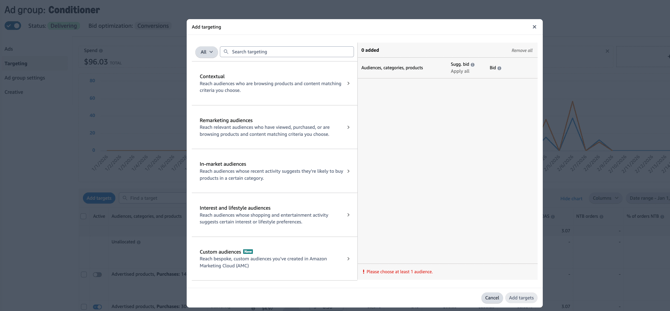
-
Review and Add the Audience: Confirm the audience details and add them to your SD campaign as needed.
Frequently Asked Questions (FAQs)
Why can’t I see the audience I created in AMC?
AMC audiences can take up to 48 hours to appear after being created. Ensure you’ve waited the required time and check back later.